If you’ve made money from YouTube this year — ad revenue, a brand deal, an affiliate link, even a box of free gear — the IRS considers you a business owner. That comes as a surprise to a lot of creators, and it’s the reason so many either overpay every April or get blindsided by a tax bill they didn’t plan for.
This guide covers what every YouTuber needs to understand about taxes: why your income counts as self-employment, the two taxes you actually owe, what counts as taxable income, how to report it, and when it makes sense to bring in a professional. Think of it as the map — later sections link out to deep dives on deductions, quarterly payments, and business structure once you’re ready to go further.
Quick answer: YouTube income is self-employment income. You’ll owe regular federal income tax on your profit, plus a 15.3% self-employment tax that covers Social Security and Medicare. You report it on Schedule C and Schedule SE, whether or not a platform ever sends you a 1099.
Why YouTube Income Is Taxed as Self-Employment, Not a Hobby
The first question the IRS asks isn’t “how much did you make?” It’s “were you trying to make money?”
That distinction matters because hobby income and business income are treated very differently. Hobby income is still taxable, but you can’t deduct expenses against it. Business income lets you subtract your costs before you’re taxed on what’s left — which is a much better position to be in.
Under IRC Section 183, the IRS looks at whether an activity is engaged in “for profit.” There’s no single test, but the agency weighs factors like:
- Do you run the channel in a businesslike way (separate bank account, records, a content plan)?
- Do you have the knowledge or expertise to make this profitable, or are you developing it?
- How much time and effort do you put in?
- Have you made a profit in some years, and how much?
- Does your financial situation suggest you’re relying on this income?
- Is there an element of personal recreation, or is this run like work?
There’s also a helpful shortcut: if your channel shows a profit in three of the last five years, the IRS presumes it’s a business rather than a hobby. Most monetized YouTubers — anyone uploading consistently, chasing sponsorships, optimizing for the algorithm, treating the channel like it matters — clear this bar easily. If AdSense, brand deals, or affiliate income show up in your bank account, you’re almost certainly running a business in the IRS’s eyes, whether you’ve formally registered one or not.
That means your YouTube income belongs on Schedule C as self-employment income, not as “other income” on your 1040. And that one classification is what triggers everything else in this guide.
Source: IRS — Here’s how to tell the difference between a hobby and a business for tax purposes
The Two Taxes You Owe (With a Worked Example)
Once your channel counts as a business, you owe two separate taxes on your profit:
- Federal income tax — the same progressive tax everyone pays, based on your tax bracket.
- Self-employment tax — 15.3% that covers the Social Security and Medicare contributions an employer would normally split with you. As a self-employed creator, you pay both halves.
Employees have this handled automatically: their employer withholds income tax and pays half of Social Security and Medicare out of pocket. When you’re self-employed, there’s no employer, so the full 15.3% lands on you — 12.4% for Social Security (on net self-employment earnings up to $184,500 for 2026) and 2.9% for Medicare (on all of it, with an extra 0.9% Medicare surtax once income passes $200,000 single / $250,000 married filing jointly). This is calculated on 92.35% of your net profit, not the full amount, to roughly account for the fact that an employee’s wages aren’t taxed on the employer-paid share either.
Here’s what that looks like with real numbers, for a mid-size channel earning income from a mix of sources:
| Line item | Amount |
|---|---|
| AdSense revenue | $28,000 |
| Sponsorships | $15,000 |
| Affiliate commissions | $4,000 |
| Merch profit | $3,000 |
| Gross income | $50,000 |
| Deductible business expenses (gear, editing software, contractor pay, home office, travel, etc.) | –$13,700 |
| Net profit (Schedule C, Line 31) | $36,300 |
| Self-employment tax (15.3% of 92.35% of net profit) | $5,129 |
| Deduction for half of SE tax | –$2,565 |
| Taxable income (after the 2026 standard deduction) | $17,635 |
| Federal income tax (2026 single-filer brackets) | $1,868 |
| Total federal tax owed | $6,997 |
| Take-home profit | $29,303 |
| Effective tax rate on net profit | ≈ 19% |
This example assumes a single filer taking the standard deduction with no other income — your actual numbers will shift with filing status, state taxes (not included here), and how many deductions you claim. It also leaves out the Qualified Business Income (QBI) deduction, which many creators qualify for and which could lower the income-tax portion further; we skipped it here because the exact amount depends on your total taxable income, and we wanted the math to stay easy to follow. Ask a tax pro whether you qualify. Even without it, the shape holds for most creators: self-employment tax is usually the bigger surprise, not income tax, because there’s no threshold to clear — it applies starting at just $400 of net profit.
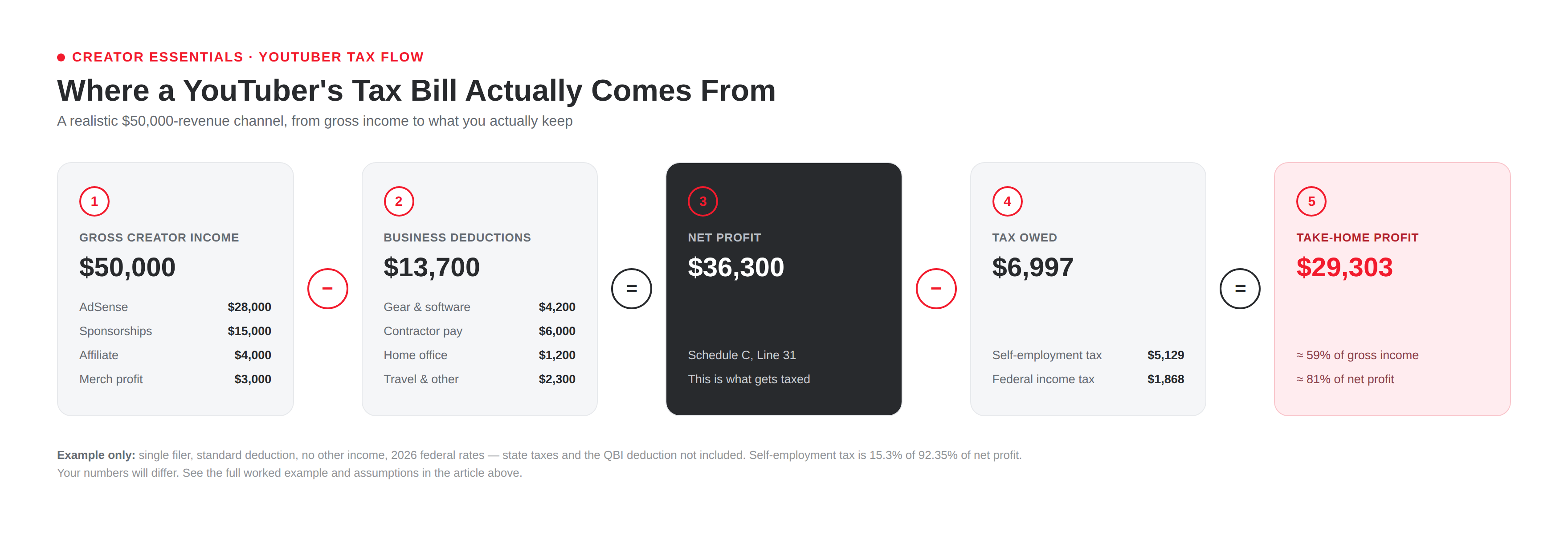
Source: IRS — Self-Employment Tax (Social Security and Medicare Taxes)
What Counts as Taxable Creator Income
If money or something of value came to you because of your channel, assume it’s taxable until you or a tax pro confirms otherwise. That includes:
- AdSense / ad revenue — the most obvious one, and fully taxable.
- Channel memberships, Super Chat, and Super Thanks — taxed as ordinary business income.
- Sponsorships and brand deals — including flat fees, usage rights payments, and affiliate bonuses baked into the deal.
- Affiliate links and commissions — Amazon Associates, creator storefronts, software affiliate programs, all of it.
- Patreon, Ko-fi, and other membership platforms — treated the same as any other business income.
- Merch profit — your net proceeds after cost of goods, not your gross sales.
- Gifted products and PR packages — this one trips people up. If a brand sends you something in exchange for a review, a mention, or with any expectation of coverage, the IRS treats it as a bartered payment taxable at fair market value. A genuinely no-strings-attached gift is different, but most PR mailers aren’t — read the pitch email before you assume it’s a freebie.
The common thread: it doesn’t matter whether the payment showed up in cash, in a Venmo transfer, or in a box on your porch. If it has value and it’s connected to your channel, it belongs in your gross income.
Reporting Income: Schedule C, Schedule SE, and Why You Report Even Without a 1099
Your creator income gets reported in two main places on your tax return:
- Schedule C (Form 1040) — where you report your total income and subtract your business expenses to arrive at net profit or loss.
- Schedule SE (Form 1040) — where that net profit is used to calculate your self-employment tax.
Both flow into your regular Form 1040.
Here’s the part that catches new creators off guard: you don’t need to receive a 1099 to owe tax on the income. Platforms and brands are only required to send you a form once you cross certain thresholds:
- Form 1099-NEC, from a company that paid you directly for services (like a sponsor), is required once payments to you exceed $2,000 in 2026 (up from $600 in prior years).
- Form 1099-K, from a payment platform or marketplace, is required once you cross $20,000 and 200 transactions in a calendar year.
That means a creator who earned $8,000 from three separate sponsors, none of whom individually paid more than $2,000, might not receive a single tax form — and still owes tax on the full $8,000. Under U.S. tax law, all income is taxable unless the law specifically excludes it. There’s no “under $600 so it doesn’t count” rule; that’s one of the most common myths in creator tax advice. Keep your own records of every payment and don’t wait on a form to show up before you report it.
Sources: IRS — About Schedule C · IRS — About Schedule SE · IRS — Understanding Your Form 1099-K
Deductible Expenses: The Overview
Every dollar of legitimate business expense reduces the profit you’re taxed on — which means it reduces both your income tax and your self-employment tax. Common categories for creators include:
- Cameras, microphones, lighting, and other gear
- Editing software and subscriptions (Adobe, Epidemic Sound, TubeBuddy, etc.)
- A dedicated home office space
- Contractors — editors, thumbnail designers, VAs
- The business-use portion of your phone and internet
- Travel for shoots, collabs, or creator events
- Music and stock footage licensing
- Courses, books, and coaching related to your channel
The rules on what qualifies, how to calculate a home office deduction, and what documentation you need get detailed fast. We cover all of it — including the deductions creators most often miss — in Every Deduction YouTubers Can Claim →.
Quarterly Estimated Taxes, Explained
Because no one withholds tax from your AdSense payout, the IRS expects you to pay as you go throughout the year rather than settling up all at once in April. If you expect to owe $1,000 or more in tax for the year, you’re generally required to make quarterly estimated payments — miss them, and you can owe a penalty even if you pay everything by the filing deadline.
For 2026, the estimated payment due dates are:
- April 15, 2026 — Q1
- June 15, 2026 — Q2
- September 15, 2026 — Q3
- January 15, 2027 — Q4
Most creators calculate their payments using a safe harbor rule: pay at least 90% of what you’ll owe for the current year, or 100–110% of what you owed last year, whichever is easier to estimate. We walk through exactly how to calculate your payments, adjust them as your income grows, and avoid the underpayment penalty in Quarterly Estimated Taxes for YouTubers →.
Business Structure Basics: Sole Prop vs. LLC vs. S-Corp
Most creators start as a sole proprietor by default — there’s no paperwork to file, and your business income and personal income are legally the same thing. That’s fine for a lot of channels, but it also means no liability protection.
An LLC adds a legal separation between you and the business, which can matter as your brand deals and revenue grow. For tax purposes, though, a single-member LLC is still treated as a sole proprietorship by default — same Schedule C, same self-employment tax — unless you elect otherwise.
That’s where an S-corp election comes in. Once a channel is consistently profitable, electing S-corp status can reduce the amount of income subject to self-employment tax, because you pay yourself a “reasonable salary” (subject to payroll tax) and take remaining profit as a distribution (which isn’t). It’s not something to rush into — S-corps come with payroll requirements, extra filings, and added accounting cost, so it only pays off once your profit is high enough to offset that overhead.
None of this is a one-size-fits-all decision, and getting it wrong can cost more than it saves. We break down the real numbers — including roughly where the S-corp math starts to make sense — in LLC vs. S-Corp for YouTubers →.
Recordkeeping: What to Save and for How Long
Good records are what make deductions defensible and quarterly payments accurate. At minimum, hold on to:
- Income records: AdSense payout reports, sponsorship invoices and contracts, Patreon/Ko-fi statements, any 1099s received
- Expense receipts for gear, software, contractors, and travel
- A mileage log if you deduct vehicle use
- Bank and credit card statements for your business accounts
- Documentation for gifted products (what you received, from whom, and its approximate value)
How long to keep them: the IRS generally recommends keeping records for three years from the date you filed, but that window extends to six years if you underreported income by more than 25%, and there are situations (like claiming a loss on bad debt) where seven years applies. Because it’s hard to know in advance which situation you’ll fall into, most tax pros — us included — tell creators to follow a simple seven-year rule: keep everything related to a given tax year for seven years, and keep records tied to equipment or property for as long as you own it plus seven more years after you sell or retire it. A folder per tax year, backed up somewhere other than your laptop, is usually enough.
Source: IRS — Recordkeeping
When to DIY vs. When to Hire a Pro
If your channel has one income stream, modest revenue, and a handful of straightforward deductions, filing it yourself with good tax software is a completely reasonable choice. Plenty of creators do it well.
It’s worth bringing in a professional when:
- You have multiple income types — ad revenue, sponsorships, merch, affiliate, gifted products — hitting your return at once
- This is your first year owing quarterly estimated taxes and you want to get the numbers right from the start
- You’re considering an LLC or S-corp and need the actual math for your income, not a rule of thumb
- You’d rather spend the time filming than reading Schedule C instructions
- You just want a second set of eyes confirming you’re not leaving deductions on the table — or setting yourself up for a letter from the IRS
That’s the gap Creator Essentials exists to close. I’m a licensed tax professional who also understands creator income specifically — what AdSense actually pays out, how sponsorship contracts are structured, what a gifted PR package is really worth on paper. Most tax pros are guessing at that part. I’m not.
Get Your YouTuber Taxes Done →
Not ready to commit? Ask a question first →
Frequently Asked Questions
Do I owe taxes if I made less than $600 from YouTube? Yes, if it’s taxable income. The $600 (or $2,000, as of 2026) figure is a reporting threshold that determines when a company has to send you a 1099 — it has nothing to do with when you owe tax. All income is taxable regardless of amount unless the law specifically says otherwise.
Do I have to pay taxes on gifted products or PR packages? Usually, yes, at fair market value, if the brand sent it with any expectation of a review, mention, or coverage. A true unsolicited gift with no strings attached is treated differently — when in doubt, keep the pitch email as documentation and ask a tax professional.
What if my channel isn’t monetized yet — do I still need to report income? If you’re not earning money, there’s nothing to report. Once you start earning from any source (not just the YouTube Partner Program), the income becomes reportable.
Can I deduct a camera or laptop I also use personally? Yes, but only the business-use portion. If you use your laptop 60% for editing and 40% for personal use, you can generally deduct 60% of its cost, and you’ll want to be able to explain how you arrived at that percentage.
More in This Tax Series
This article is for general educational purposes and isn’t personalized tax advice. Tax law changes, and your specific situation matters — talk to a licensed tax professional before making decisions based on anything here.